Having access to Claude Code is one thing. Knowing how to build effectively with AI is another.
AI can help you write code faster, automate tasks and delegate work to agents. But there’s a difference between using AI to speed up individual tasks and changing how software gets built.
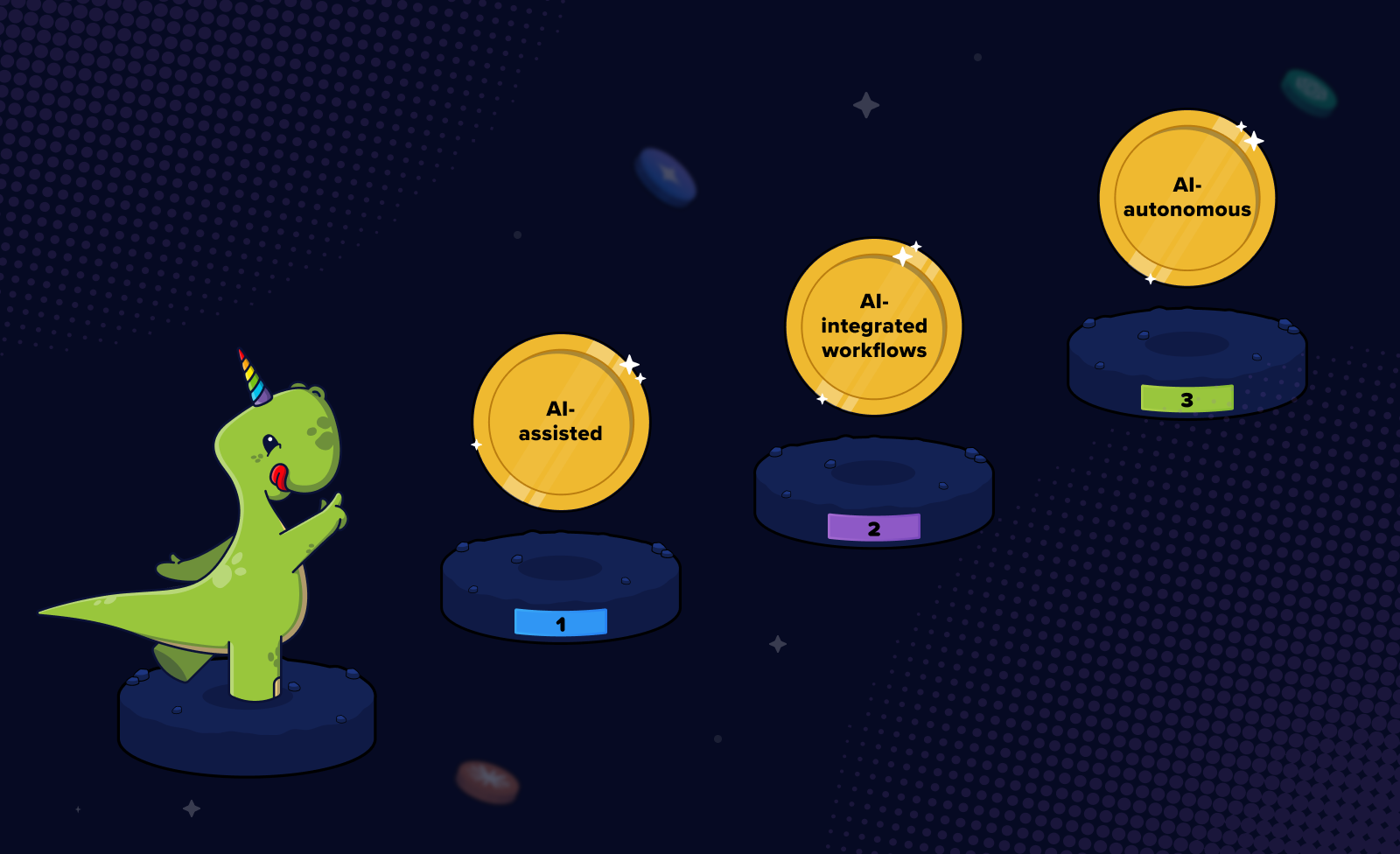
This framework for AI-enabled software development, co-created with OfferZen’s Product team, maps this shift across three levels: AI-Assisted, AI-Integrated and AI-Autonomous.
Designed to complement existing AI enablement frameworks, it focuses on AI delegation: how much work is handed over to AI and how that changes the way software gets built. It helps engineers and product teams understand what distinguishes each level, assess their current approach and identify what it takes to progress.
3 levels of AI-enabled software development
The three levels of AI-enabled engineering show how teams use AI in software development, from AI-assisted tasks to integrated workflows and autonomous agents. Here’s what each level looks like in practice, with examples from engineering, data, design and product.
Level 1: AI-assisted
What it is
At Level 1, AI helps with individual, well-defined tasks, but the human remains in control of the process. You prompt the AI, review its response and decide what to do next.
Each interaction is standalone, with the human responsible for the setup, decisions and follow-through. AI helps with specific tasks, but the overall workflow stays the same.
What it looks like across roles
- In engineering: Asking ChatGPT to explain an error message or stack trace; using GitHub Copilot's inline autocomplete for boilerplate; prompting for a regex pattern or SQL snippet; asking an LLM to draft a unit test.
- In data: Asking an LLM which statistical test might be appropriate; using ChatGPT to draft a SQL query and manually correcting it; prompting for help interpreting a chart or summarising a dataset.
- In design: Using Midjourney or DALL·E for mood board inspiration; prompting for UX copy variations; asking AI to summarise competitor screenshots into key themes.
- In product: Asking ChatGPT to draft a user story or PRD section; using AI to summarise a single customer interview transcript; prompting for alternative feature names.
How to spot it
Level 1 is easy to spot: it’s the classic one-in, one-out setup. Every AI interaction stands alone. There’s no link to what came before or what comes next, no way to repeat the process without starting over, and no built-in review step. If you stop prompting, everything grinds to a halt.
Why it’s a valid starting point but not a finishing line
Level 1 helps builders build familiarity with AI: understanding what it’s good at, how to get useful results, and where it falls short. These skills lay the groundwork for more advanced ways of working with AI.
But there’s a limit to what one-off interactions can achieve. They can speed up individual tasks, but the overall workflow stays the same. The time saved on one task doesn’t necessarily translate into broader productivity gains across the team.
Moving beyond Level 1 means taking what you’ve learned about working with AI and applying it to repeatable workflows. Knowing how to write a good prompt, provide the right context and evaluate the output is a useful foundation. The next step is building those skills into how work gets done.
Level 2: AI-integrated
What it is
At Level 2, AI becomes part of the workflow, not just a tool you turn to for individual tasks. You build it into repeatable processes, giving it a defined role and clear inputs and outputs.
This is where productivity gains can start to add up. Instead of manually handling the same tasks each time, AI takes on recurring tasks within a structured workflow, freeing developers to focus on complex problems that benefit most from human judgement.
What it looks like across roles
- In engineering: An AI code review bot that comments on every PR before human review; AI-generated tests that run as part of CI; an IDE agent that implements a well-scoped ticket for a developer to review; a Slack bot that triages bug reports, pulls context from logs and the codebase, and drafts a Linear ticket for validation.
- In data: AI-generated commentary for weekly metrics dashboards, reviewed by an analyst before publication; automated data quality checks that flag issues in new tables before they’re merged; an ETL step where AI suggests schema changes based on incoming source data, subject to human sign-off.
- In design: A workflow that generates five layout variations from a brief for a designer to refine; AI-assisted research synthesis that turns interview transcripts into themes for validation; a Figma MCP that generates design-system-compliant components from sketches.
- In product: AI synthesis of themes across ten or more customer calls, with the PM validating and prioritising insights; release notes drafted automatically from merged tickets and reviewed before publishing; an AI-assisted backlog grooming workflow that clusters and tags incoming feature requests.
How to spot it
The defining features of Level 2 are repeatability and integration. AI has a defined role in a workflow, with clear inputs, expected outputs and checkpoints for human review. The process runs consistently without someone having to prompt AI from scratch each time.
Developers can point to workflows they’ve built, such as an AI code review integrated into CI, an IDE agent that handles defined tasks, or reusable prompt templates. The key is that AI is built into the process, not just used on demand.
The jump from Level 1 to Level 2
Moving to Level 2 means identifying recurring tasks that AI can handle reliably, then building them into repeatable workflows. That involves providing the right context, connecting the necessary tools and deciding where human review is needed.
It takes upfront effort, but the payoff is a workflow that saves time every time it runs, freeing developers to focus on system design, solving complex technical problems, and making architectural decisions that require human judgement.
Watch OfferZen’s Head of Engineering build a real product feature using Level 2 AI workflows.
Level 3: AI-autonomous
What it is
At Level 3, AI moves beyond individual tasks and repeatable workflows to executing entire processes autonomously. Multiple agents can work together to investigate problems, implement solutions, run tests and review the results.
Humans set the goals and constraints, oversee execution and step in at key decision points, while agents handle the work in between.
What it looks like across roles
- In engineering: An agent detects a production bug, investigates the logs and relevant code, and creates a scoped Linear ticket. Another agent picks up the ticket, implements a fix, runs tests, and opens a PR for human review. Teams can also run coding agents overnight against a backlog of well-defined tickets, with engineers reviewing the resulting PRs the next morning.
- In data: An agent monitors data quality, detects anomalies, traces the likely cause across upstream tables, and proposes a fix for analyst review. Another workflow takes a business question, queries multiple tables, iterates on the analysis, and produces a report with supporting data and caveats.
- In design: An agent takes a written brief, generates prototype variations, runs automated usability and design checks, and presents the strongest options for designer review. A separate workflow monitors design-system compliance and proposes fixes when components drift from established guidelines.
- In product: A PM provides the goal and constraints, and an agent produces a draft PRD complete with edge cases and a rollout plan for review. Meanwhile, agents continuously analyse customer feedback across channels and update a shared document of emerging themes.
How to spot it
The biggest sign of Level 3 is how the human’s role changes. Instead of managing each step, engineers define the problem, set constraints and review outcomes. Their focus shifts from “How do I solve this?” to “How do I build a system that can solve this reliably?”
You’ll also hear software developers talk about harnesses, sandboxes and skills libraries, the infrastructure and safeguards that let agents work with less supervision. They decide which tasks can run autonomously (AFK) and which need human input.
Importantly, developers can explain how their systems handle failures, verify results, and know when to involve a human. Without these safeguards, letting agents run on their own is not the same as running them reliably.
What level 3 means for engineering managers
Reaching Level 3 takes more than adopting new tools. Engineering managers need to invest in making autonomous workflows reliable and rethink how work gets done across the team.
Invest time in building and refining.
The harness doesn’t build itself. Reliable autonomous workflows take experimentation, iteration and time to get right. Delivery may slow down in the short term as teams refine their setups, but that investment can pay off over time.
Here’s how South African tech teams are making it work:
- OfferZen: Dedicated cooldown sprints give the team protected time to improve its harness alongside regular feature delivery.
- Jem: Friday sessions are set aside for exploration, but much of the harness refinement happens in day-to-day work. When an agent fails, the team improves the setup to make the next run more reliable.
- Coronation: Every two weeks, teams demo what's working to a Dev Centre of Excellence, which decides whether to roll out each experiment, tighten its guardrails, or drop it. The wider department also meets separately to share learnings across teams.
Evolve the SDLC and redistribute who does what.
Level 3 also changes how teams plan, build and review software. As agents take on more execution, engineering managers need to reconsider how responsibilities are distributed and where human judgement adds the most value.
Here’s how South African tech teams have adapted:
- OfferZen: A designer requests a change, an agent implements it, and an engineer reviews the result and owns the outcome.
- Jem: Product and engineering have merged into one discipline. Engineers own the full journey, from customer discovery to measuring outcomes in production.
- BMEC Technologies: Engineers who previously focused on implementation have moved into reviewer roles. Their focus has shifted from checking technical correctness to assessing whether the right AI tools are being used effectively.
- Coronation: An orchestrator routes requests to specialist agents, including an architect agent that drafts a build plan. A human reviews the plan, requests amendments if needed, and signs off before implementation begins.
Across all four teams, engineering managers are actively rethinking how work gets done. Giving people access to AI agents isn't enough. Teams need to redesign their workflows and rethink who is responsible for each stage of the process.
How to use this framework in practice
If you are a software developer
Use the framework to assess how you work with AI. Look at the tasks you do regularly. Are you using AI for one-off assistance (Level 1), building it into repeatable workflows (Level 2), or orchestrating multi-step processes with autonomous agents (Level 3)?
When discussing AI in interviews, go beyond listing the tools you use. Explain how you use them, what your workflow looks like, how you validate the output, and what you’ve learned or changed as a result.
As Thamsanqa Moyo, CTO at Jem, explains, employers want to hear what candidates can do with AI and what they want to explore next, rather than just what they avoid or believe AI cannot do.
Andrew, Chief Product and Technology Officer at Pollinate, puts it simply:
“Don't tell us you use AI, tell us how you use AI, what you've caught, and then what you found from it, and what you changed.”
If you are an engineering leader or hiring manager
Use the framework to assess candidates’ AI capabilities during the hiring process. Go beyond asking which tools they use. Ask candidates to walk you through how they’ve used AI in practice, how they validate its output, and where they apply their own judgement.
For example, “Tell me about a workflow you’ve built using AI” can help you assess Level 2 experience, while “How have you used or managed autonomous AI agents?” can help you explore Level 3 capabilities.
You can also use the framework to assess your team's current capabilities and decide where you want to be in the next six to twelve months. Identify what's holding you back, whether it's tooling, processes, team habits or the time and investment needed to change how work gets done.
The goal isn't to reach Level 3 across every workflow. It's to understand how AI is being used, what each workflow requires and which level makes sense for the work involved.
Prefer to watch? See how AI-enabled teams build with AI
At this online event, Barbara Fourie, OfferZen’s Head of Product, introduced the framework, followed by Nick van Noordwyk, Head of Engineering, who demonstrated a Level 2 workflow in action and explored what it takes to move towards Level 3. Engineering leaders from Jem and BMEC then shared how their teams are navigating the same transition.